
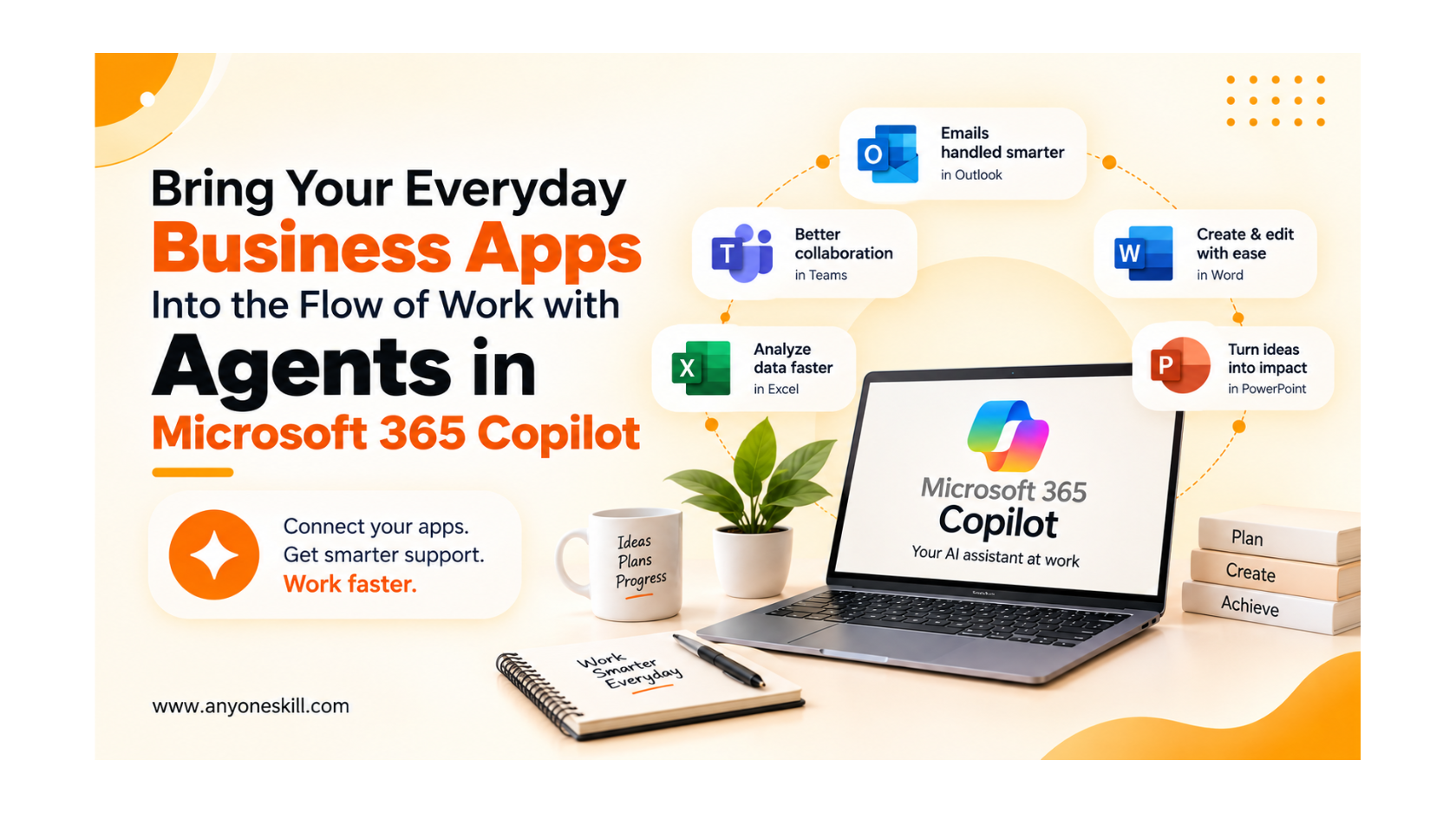
Bring your everyday business apps into the flow of work with agents in Microsoft 365 Copilot
Modern workplaces use multiple business apps every day - for emails, meetings, documents, customer information, project updates, reports, and many other tasks. While these tools make work possible, but in the other hand, they can also create a common problem like : Our work and information become scattered across different applications.
This is where agents in Microsoft 365 Copilotthat can change the way everyday work gets done. Agents can help bring information and capabilities from business applications into the flow of work, allowing people to find information, interact with business data, and complete multi-step tasks with AI assistance.
Apps designed for the way teams actually work
1. Microsoft 365 Copilot — AI Assistance Across Your Work
5. Copilot in Microsoft Teams — Turn Conversations into Action
As AI becomes part of everyday work, the real advantage comes from knowing how to use it for the task in front of you. Whether you are preparing a document, summarizing lengthy information, researching a topic, organizing ideas, creating a work plan, or finding a faster way to approach a repetitive task, the quality of your instructions can make a significant difference.
Developing a better understanding of how to use AI effectively for everyday workcan help you move from simply asking questions to using AI as a practical part of your daily workflow.
Think about a normal workday. You receive an email about a project, search for the related document, check another system for updated information, copy important details into a spreadsheet, update your team, and then move to the next task. None of these steps may seem difficult on their own, but repeating them throughout the day can consume valuable time and break your focus.
The real challenge is not simply having too many apps. It is getting the right information from those apps and turning it into action without constantly switching between them.
This is where agents in Microsoft 365 Copilotthat can change the way everyday work gets done. Agents can help bring information and capabilities from business applications into the flow of work, allowing people to find information, interact with business data, and complete multi-step tasks with AI assistance.
Instead of thinking of AI as just another tool to open, the idea is to make it part of the applications and workflows employees already use.
In this blog, we’ll understand what agents in Microsoft 365 Copilot are, how they work with everyday business applications, which workplace problems they can address, and how organizations can use them in practical day-to-day scenarios.
In this blog, we’ll understand what agents in Microsoft 365 Copilot are, how they work with everyday business applications, which workplace problems they can address, and how organizations can use them in practical day-to-day scenarios.
Apps designed for the way teams actually work
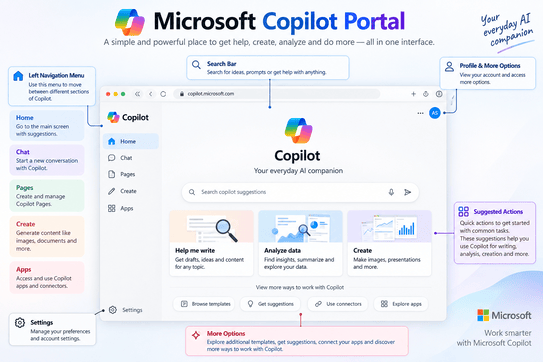
1. Microsoft 365 Copilot — AI Assistance Across Your Work
Microsoft 365 Copilot is an AI assistant designed for workplace productivity. It works across Microsoft 365 applications and can use relevant work context—such as files, messages, meetings, and other permitted organizational data—to help users complete everyday tasks.
You can communicate with Copilot using natural-language instructions. Depending on the app and the Microsoft 365 Copilot capabilities available to your organization, you can ask it to draft content, summarize information, analyze data, find insights, or help you prepare for work.
You can communicate with Copilot using natural-language instructions. Depending on the app and the Microsoft 365 Copilot capabilities available to your organization, you can ask it to draft content, summarize information, analyze data, find insights, or help you prepare for work.
Example:Instead of manually collecting information from different sources before preparing an update, you can use Copilot to help find and summarize relevant information and then use that context as a starting point for your work.
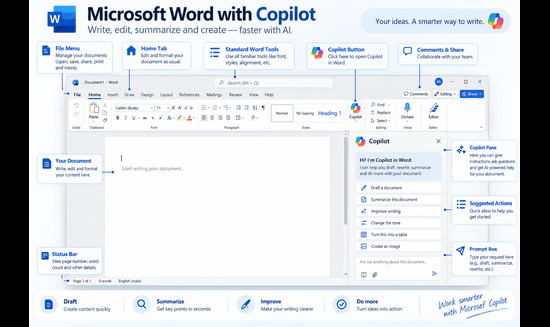
2. Copilot in Microsoft Word — From Ideas to Better Documents
Writing a document in Microsoft Wordoften involves more than typing. You may need to create the first draft, reorganize information, rewrite difficult sections, summarize long content, or adjust the language for a particular audience.
Copilot in Word can help with tasks such as:
-
Creating a first draft from your instructions.
-
Summarizing a long document.
-
Rewriting content to make it clearer or more concise.
-
Asking questions about information contained in a document.
-
Generating or expanding content based on your ideas.
For example:
Suppose you need to prepare a project report. Instead of starting with a blank page, you could ask:
“Create a project status report with sections for completed work, current progress, challenges, and next steps.”
Copilot can provide a starting draft that you can review, verify, and customize before sharing.
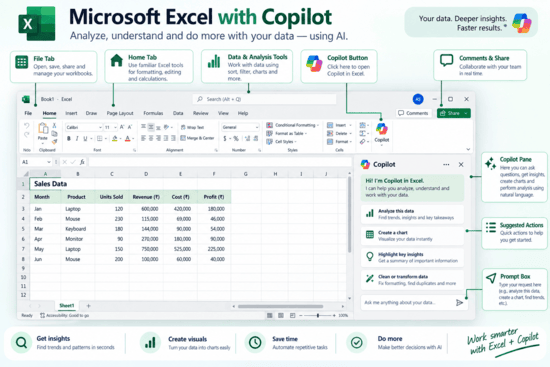
3. Copilot in Microsoft Excel — Understand Your Data Faster
Spreadsheets on Microsoft Excel can contain valuable information, but understanding large amounts of data, identifying patterns, creating formulas, and turning numbers into useful insights can require considerable effort.
Copilot in Excel can assist with:
-
Analyzing spreadsheet data.
-
Identifying trends and patterns.
-
Helping create and understand formulas.
-
Highlighting useful insights.
-
Creating visualizations and charts.
-
Answering questions about your data using natural language.
For example:
Imagine you have monthly sales data containing hundreds of rows. Rather than reviewing every entry manually, you could ask:
“Analyze this sales data and identify the strongest-performing products and important monthly trends.”
Copilot can help you explore the data and surface insights that you can then verify and use in your analysis.
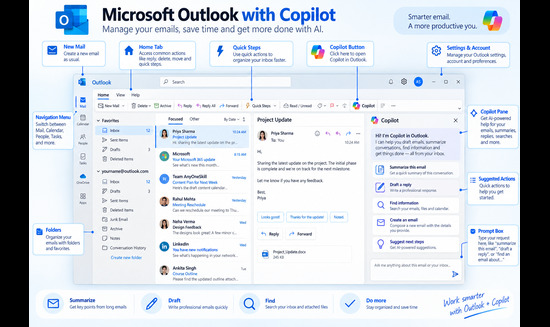
4. Copilot in Microsoft Outlook — Make Email and Calendar Work More Manageable
A busy inbox can quickly become difficult to manage. Long email conversations, unanswered messages, follow-ups, and meetings can make it harder to identify what actually needs your attention.
Copilot in Outlookcan help with tasks such as:
-
Summarizing long email threads.
-
Drafting emails and replies.
-
Adjusting the tone and length of a message.
-
Identifying information and potential action items from conversations.
-
Working with inbox and calendar information, depending on the Copilot capabilities available to your account.
For example:
Imagine returning to work and finding a long project email thread. Instead of reading every message individually, you can use Copilot to understand the key points and then ask it to help draft an appropriate response.
This can make it easier to catch up, understand the conversation, and take the next action.
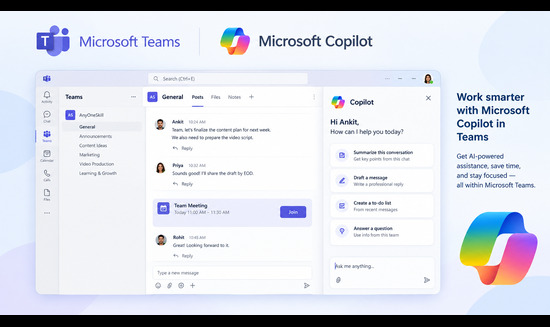
5. Copilot in Microsoft Teams — Turn Conversations into Action
Meetings and team conversations contain important information, but remembering every decision, responsibility, and next step can be challenging—especially when you have several meetings in one day.
Copilot in Microsoft Teams can help you:
-
Summarize meetings and conversations.
-
Identify important discussion points.
-
Surface action items.
-
Catch up on information you may have missed.
-
Ask questions about a meeting or conversation.
-
Organize key information from team discussions.
For example:
After a project meeting, you could ask:
“Summarize the key decisions from this meeting and list the action items discussed.”
Instead of manually going through your notes, you get a structured starting point showing what was discussed and what needs attention next.
What Is Microsoft Security Copilot?
Cybersecurity teams deal with thousands of alerts, suspicious activities, login attempts, devices, and security events every day. Investigating all of this information manually can take a lot of time.
Microsoft Security Copilot is an AI-powered cybersecurity assistant designed to help security and IT teams understand threats, investigate security incidents, find risks, and respond to problems more quickly.
It combines generative AI, Microsoft's global threat intelligence, security data, and information from an organization's connected security tools to provide useful insights and recommendations.
How Does Microsoft Security Copilot Work?
The basic process needs to understand in four steps.
Step 1: Security Data Is Connected
Security Copilot can work with information available through Microsoft's security ecosystem and supported integrations.
It works with Microsoft products such as:
Microsoft Defender, Microsoft Sentinel, Microsoft Entra, Microsoft Intune, and Microsoft Purview, along with supported third-party services.
Step 2: The User Asks a Question
A security professional can interact with Security Copilot using normal, conversational language.
For example:
“Summarize today's major security incidents.”
or
“Explain why this user has been identified as risky.”
The user does not always need to write complicated security queries manually.
Step 3: Copilot Analyzes Relevant Security Information
Security Copilot combines AI models with Microsoft's security-specific capabilities, threat intelligence, and the information available through the organization's connected security environment.
It then processes the request and identifies relevant information.
Step 4: Copilot Provides an Answer or Recommended Action
Security Copilot can return information such as:
Security data → AI analysis → Summary + Context + Recommended next steps
The security professional can then review the output and decide what action should be taken.
Security Copilot is designed to assist security professionals rather than eliminate the need for human review and security expertise.
Knowing what Copilot can do is only the beginning. Building confidence with AI at work comes from applying these tools to real tasks such as writing documents, analyzing data, managing communication, and improving everyday workflows. Learners who want to develop these abilities further can explore practical AI and workplace skills through structured, hands-on learning.
As AI becomes part of everyday work, the real advantage comes from knowing how to use it for the task in front of you. Whether you are preparing a document, summarizing lengthy information, researching a topic, organizing ideas, creating a work plan, or finding a faster way to approach a repetitive task, the quality of your instructions can make a significant difference.
Developing a better understanding of how to use AI effectively for everyday workcan help you move from simply asking questions to using AI as a practical part of your daily workflow.
Microsoft 365 Copilot shows how AI can become part of the tools we already use at work, but AI assistance is not limited to workplace applications. Other AI assistants can support a much wider range of everyday activities. For example, [Claude AI can be used for studying, work, and everyday tasks]—from understanding complex topics and organizing information to writing, planning, brainstorming, and working through day-to-day problems.
As AI becomes part of everyday workplace tools, knowing which skills are relevant to a particular role becomes increasingly important. Someone working in marketing may need a different combination of AI skills from someone working in data, operations, content, or administration. Understanding your goals first can make it easier to [identify the right skills for your career path]and build a more focused learning plan.
As AI becomes part of everyday workplace tools, knowing which skills are relevant to a particular role becomes increasingly important. Someone working in marketing may need a different combination of AI skills from someone working in data, operations, content, or administration. Understanding your goals first can make it easier to [identify the right skills for your career path]and build a more focused learning plan.
Final Thoughts: Making Everyday Work More Connected
The biggest challenge in modern work is often not a lack of tools—it is managing information and tasks across too many of them. Emails sit in Outlook, data lives in Excel, documents are created in Word, conversations happen in Teams, and important business information may exist across other systems.
Microsoft 365 Copilot and agents can help bring these pieces closer together. Instead of spending as much time searching, switching between apps, summarizing information, or repeating routine steps, people can use AI assistance to help find information, understand context, create content, analyze data, and move work forward across everyday workflows.