
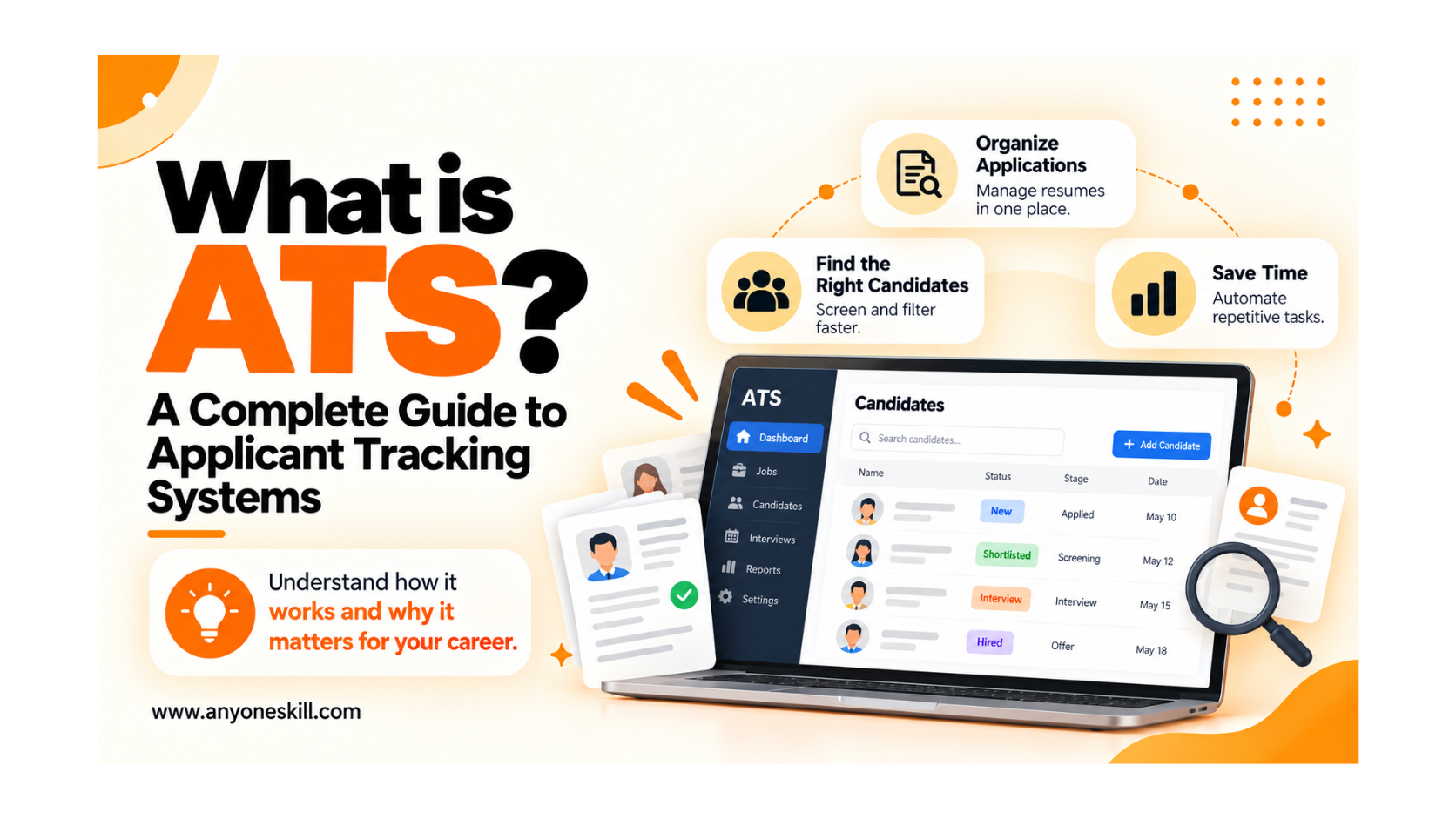
What is ATS? A Complete Guide to Applicant Tracking Systems
1. Introduction to ATS
Today, most of the companies are using a online platforms to hire employees and manage job applications. When a company posts a job opening, it may receive hundreds or even thousands of resumes. Reviewing every application manually can be time-consuming and difficult for recruiters.
Today, most of the companies are using a online platforms to hire employees and manage job applications. When a company posts a job opening, it may receive hundreds or even thousands of resumes. Reviewing every application manually can be time-consuming and difficult for recruiters.
To make this process easier, companies use an Applicant Tracking System (ATS).
An Applicant Tracking System (ATS) is a software that helps companies collect, organize, review, and track job applications in one place. It helps recruiters manage resumes, identify candidates with relevant qualifications, and keep the hiring process organized.
For job seekers, understanding how ATS works is equally important. A simple, well-formatted, and ATS-friendly resume can help employers accurately read their skills, education, and work experience.
2. What Does ATS Stand For?
ATS stands for Applicant Tracking System.
It is software used by employers, recruiters, and Human Resources (HR) departments to manage job applications throughout the recruitment process.
An ATS helps companies store resumes, organize candidate information, track application statuses, and identify applicants with relevant qualifications.
In simple words, an ATS makes it easier for companies to manage job applications and find suitable candidates for available positions.
3. Why Do Companies Use an ATS?
Companies use an Applicant Tracking System (ATS) to simplify recruitment, manage job applications, and improve the efficiency of their hiring processes.
When a company advertises a job opening, it may receive applications from many candidates with different skills, qualifications, and experience levels. Reviewing these applications manually can take too much time, especially when the company is hiring for multiple positions.
An ATS provides a particular platform where recruiters can manage applications, review candidate information, coordinate interviews, and monitor hiring progress.
Key Reasons Companies Use an ATS:
1. To Manage Large Numbers of Applications
An ATS collects and organizes job applications in one system. This helps companies handle high application volumes without manually managing numerous resumes and emails.
2. To Reduce Manual Recruitment Work
Recruiters can automate or simplify routine activities, including application collection, candidate record updates, interview notifications, and recruitment tracking.
3. To Identify Relevant Candidates
An ATS allows recruiters to search and filter applications using job-related criteria, such as experience, qualifications, skills, and location.
4. To Keep Recruitment Information Organized
Candidate resumes, contact details, interview notes, and application histories can be stored in a centralized database, making relevant information easier to access.
5. To Improve Communication and Coordination
Recruiters, hiring managers, and HR professionals can share candidate information, exchange feedback, and coordinate recruitment activities more effectively.
6. To Monitor Hiring Progress
An ATS helps companies see how many candidates have applied, which applications are under review, and which applicants have progressed to interviews or final selection.
Overall, companies use ATS software to make recruitment more structured, reduce administrative workload, and support informed hiring decisions.
4. Key Features of an Applicant Tracking System
An Applicant Tracking System offers several features that help recruiters manage different stages of the hiring process. Although features vary across platforms, most ATS solutions focus on application management, candidate tracking, and recruitment coordination.
1. Job Posting and Application Management
An ATS allows recruiters to create job openings and collect applications from company career websites and supported job portals.
Some platforms also allow recruiters to publish job advertisements across multiple channels, helping companies manage vacancies from a single system.
2. Resume Parsing
Resume parsing is the process of extracting information from a resume and converting it into structured data.
Many ATS platforms can identify details such as a candidate's name, contact information, education, work experience, skills, and qualifications.
This helps recruiters search and review candidate information without manually entering every detail.
3. Candidate Search and Filtering
Recruiters can search their candidate database using job-related requirements, including skills, experience, qualifications, and location.
For example, a recruiter hiring a Digital Marketing Executive may search for candidates with experience in SEO, Google Analytics, content marketing, or paid advertising.
4. Recruitment Pipeline Tracking
An ATS helps recruitment teams track applicants through different hiring stages, such as application received, screening, shortlisted, interview, offer, and hired.
This gives recruiters a clear view of each candidate's progress.
5. Interview Scheduling and Communication
Many ATS platforms support interview scheduling, calendar integrations, automated email notifications, and communication between recruiters and candidates.
These features help reduce scheduling difficulties and keep recruitment activities organized.
6. Team Collaboration and Candidate Evaluation
Recruiters and hiring managers can review candidate profiles, record interview feedback, and coordinate hiring decisions within the same system.
Some platforms also offer structured interview scorecards to make candidate evaluations more consistent.
7. Recruitment Reports and Analytics
ATS software may provide reports on recruitment performance, including application volume, hiring timelines, candidate sources, and recruitment stages.
These insights help companies understand their hiring process and identify opportunities for improvement.
How Does ATS Work in Recruiting?
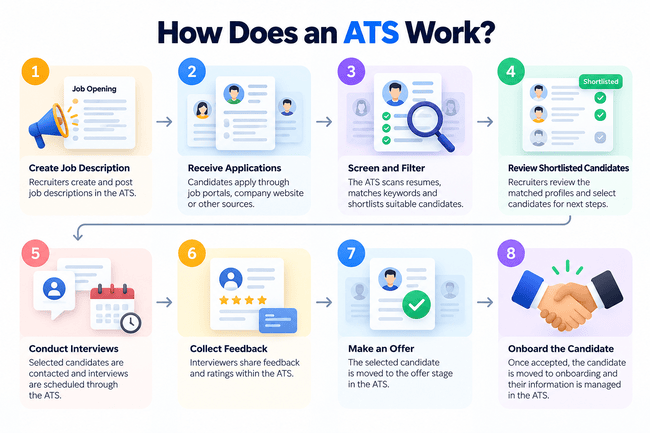
An Applicant Tracking System (ATS) helps companies manage the recruitment process by collecting, organizing, screening, and tracking job applications in one place.
When a candidate applies for a job, their application enters the ATS, where their resume and other details are stored. The system helps recruiters review qualifications, identify relevant candidates, schedule interviews, and track progress throughout the hiring process.
5. Simplified Interview Coordination

It is about connecting the right candidates with the right opportunities. By understanding ATS and following effective resume-writing practices, job seekers can approach the recruitment process with greater confidence and preparation.
Process of How ATS Works:
Step 1: Job Posting and Application Collection
Recruiters create job openings and may publish them on company career pages and job portals. When candidates apply, the ATS collects their resumes, contact details, and application information in one centralized system.
Step 2: Resume Parsing and Data Extraction
The ATS reads resumes and extracts important information such as names, skills, education, work experience, and qualifications. This process is called resume parsing, and it helps convert resume content into structured candidate profiles.
Step 3: Candidate Screening and Filtering
Recruiters use the ATS to search and filter applications based on job-related requirements, such as skills, experience, qualifications, or location. Some systems also support automated screening rules or candidate matching.
Step 4: Candidate Review and Shortlisting
Recruiters and hiring managers review relevant applications, evaluate candidate profiles, and shortlist applicants for further consideration. The ATS helps them record feedback and manage candidate information efficiently.
Step 5: Interview Scheduling and Communication
Many ATS platforms allow recruitment teams to schedule interviews, send invitations, communicate with candidates, and update their application status.
Step 6: Final Selection and Hiring
After interviews and evaluations, the hiring team selects a suitable candidate. The ATS records hiring decisions and may help manage offer letters, approvals, and other recruitment activities.
Benefits of an ATS for Job Seekers
1. Easier Online Applications
Many ATS-powered career websites allow applicants to upload resumes and complete job application forms online.
2. Resume Information Autofill
Some systems can extract information from a resume and automatically fill application fields, reducing repetitive data entry.
3. Application Confirmations
Candidates may receive an automated confirmation after successfully submitting an application.
4. Application Status Updates
Certain platforms offer candidate portals where applicants can track their application progress.
For example, Greenhouse offers a candidate portal with application tracking and job alert features.
5. Simplified Interview Coordination
Some systems allow candidates to choose interview slots or receive scheduling instructions electronically.
6. Consideration for Future Opportunities
Employers may maintain candidate databases and consider previous applicants for suitable openings, subject to their recruitment policies and data-retention practices.
Overall, ATS software supports a more structured hiring experience. However, the benefits available to applicants depend on the features enabled by each employer.
How to Make Your Resume ATS-Friendly
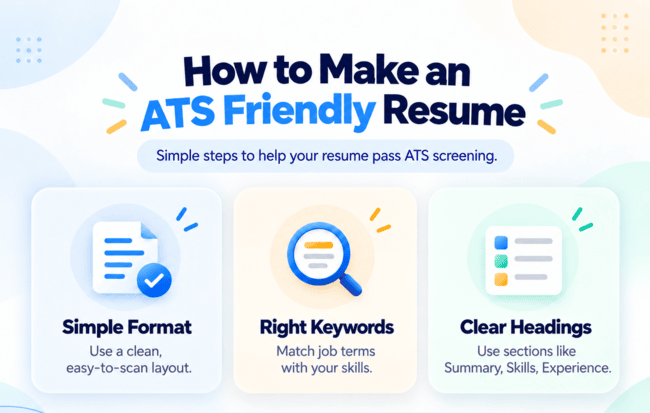
An ATS-friendly resume is a resume designed to be easy for recruitment software to read, process, and organize.
Many Applicant Tracking Systems use resume parsing technology to extract information about a candidate's education, skills, work experience, and qualifications. A clear resume structure helps this technology identify information correctly.
Creating an ATS-friendly resume does not guarantee an interview, but it can reduce formatting issues and make your qualifications easier for recruiters to review.
1. Use a Simple and Professional Resume Format
Choose a clean layout with clearly separated sections. A single-column format is often a reliable choice because it presents information in a logical reading order.
Avoid unnecessarily complicated designs, decorative elements, and layouts that depend heavily on graphics.
Professional Summary, Work Experience, Education, Skills, Certifications, Projects
2. Include Relevant Keywords From the Job Description
Read the job description carefully and identify important skills, qualifications, tools, and responsibilities.
For example, if a company is hiring a Digital Marketing Executive and requires SEO, Google Ads, and Google Analytics, include those terms where they accurately describe your skills or experience.
3. Use Standard Resume Headings
Use familiar headings so that both recruiters and resume-parsing software can easily identify information.
Recommended headings include:
Professional Summary, Work Experience, Education, Skills, Certifications, Projects
4. Clearly Mention Your Work Experience
List your job titles, company names, employment dates, and major responsibilities.
Instead of writing only general responsibilities, include specific contributions and measurable achievements where possible.
For example:
General: Responsible for social media marketing.
Improved: Planned and managed social media content across Instagram, Facebook, and LinkedIn, increasing post engagement by 25% over three months.
Only use metrics that reflect your actual work.
5. Choose a Readable Resume File Format
PDF and DOCX are commonly supported, but file-format requirements vary across employers and ATS platforms.
Always follow the instructions given in the job application. For instance, Workable supports several document formats and recommends clear sections, readable fonts, and avoiding image-only resumes.
6. Keep Important Information in the Main Resume Body
Place your contact details, qualifications, skills, and work experience in clearly visible text.
Avoid relying on graphics, text boxes, or complicated page elements to communicate important information.
7. Customize Your Resume for Relevant Job Roles
A resume should reflect the requirements of the position you are applying for.
For example, a candidate applying for a Data Analyst position should highlight relevant experience with Excel, SQL, Power BI, data cleaning, or reporting, provided they have those skills.
8. Common ATS Resume Mistakes to Avoid
Even qualified candidates can make resume mistakes that create difficulties for resume-parsing software or make their applications less effective.
Understanding these common mistakes can help job seekers create more readable and professional resumes.
1. Using Complex Resume Designs
Resumes with complicated columns, overlapping text, or unusual layouts can sometimes be difficult for parsing tools to interpret correctly.
Choose a clean, structured design that presents information logically.
2. Adding Irrelevant Keywords
Including large numbers of keywords simply to match a job description is not an effective strategy.
Recruiters need evidence of relevant experience and skills, not just repeated words.
3. Using Unclear Section Headings
Creative section titles may make information harder to identify.
For example, use "Work Experience" instead of an unusual heading such as "My Professional Adventure."
4. Submitting an Image-Based Resume
A resume saved as an image or a PDF containing only an image may be difficult for some systems to process.
Where possible, use selectable text and follow the application platform's supported file requirements.
5. Using the Same Resume for Every Job
Different positions require different skills and qualifications. A generic resume may fail to emphasize the experience most relevant to a particular role.
Adjust your summary, skills, and relevant work achievements for each suitable opportunity.
9. Popular Applicant Tracking System Software
Many companies use Applicant Tracking Systems to organize recruitment activities, manage candidates, and improve communication throughout the hiring process.
Different ATS platforms provide different combinations of features, integrations, automation, reporting, and candidate management tools.
Here are some established examples of ATS software.
1. Greenhouse
Greenhouse provides recruitment management, structured hiring workflows, interview scorecards, candidate tracking, and hiring collaboration tools. It also offers AI-assisted capabilities and a candidate portal.
2. Workable
Workable helps employers publish jobs, manage applications, search candidate databases, schedule interviews, and organize hiring workflows. It also supports recruitment reporting and automation.

3. Zoho Recruit
Zoho Recruit is a recruitment platform that offers resume parsing, job posting, candidate tracking, workflow automation, and recruitment analytics. It is designed for corporate recruitment teams and staffing agencies.
Learn More Through Practical Video Tutorials
Understanding recruitment processes is useful, but seeing real-world examples can make professional concepts easier to understand.
Video tutorials can help you explore resume preparation, digital tools, workplace skills, and other career-related topics through practical demonstrations.
For more step-by-step learning resources, explore thePractical Tutorials, where you can find educational videos and skill-development courses.
Need Guidance on Your Career Preparation?
Understanding ATS software and preparing a professional resume are useful steps toward finding a job. However, many students and freshers still have questions about which career path to choose, what skills to learn, and how to prepare for employment.
Career guidance can help you explore suitable options based on your education, interests, and professional goals.
If you are unsure where to begin, you can share your learning interests and career goals through the Career Guidance Form to request guidance on your next steps.
Conclusion
Understanding how an Applicant Tracking System (ATS) works is important for both employers and job seekers. While companies use ATS software to simplify recruitment and manage applications efficiently, job seekers can benefit by creating clear, well-structured resumes that highlight their relevant skills and qualifications.
An ATS makes the hiring process more organized, but it does not replace the importance of a candidate's experience, abilities, and suitability for the role.
Ultimately, successful hiring is not just about using the right technology or passing an ATS screening process.
It is about connecting the right candidates with the right opportunities. By understanding ATS and following effective resume-writing practices, job seekers can approach the recruitment process with greater confidence and preparation.